CI should fail on your machine first
March 9, 2026 - 8 min read
When you think of CI, you probably picture a remote server somewhere: GitHub Actions, GitLab CI, Jenkins. You push your code, you wait, and eventually you get a green checkmark or a red X.
This is so normal that we don't even question it. But why does CI have to be remote?
Remote CI means that every time you want to know if you're going to get to merge your changes, you have to:
- Commit your changes.
- Push them.
- Wait for a runner to pick up the job.
- Wait for it to install dependencies, build, test...
- Switch context to something else because you can't just sit there.
- Come back later, find the failure, and try to remember what you were doing.
This is the feedback loop we've all accepted as normal. What if CI could fail on your machine, before you even push?
What is local-first CI?
Local-first CI means designing your checks to run on your machine first, and then running the same checks remotely. For example: make a script like ./ci.sh and run it both locally and remotely.
Because CI's value comes from failing, local-first CI is more valuable sooner when it can fail before you even commit.
Here is a comparison between local-first and the usual remote-only CI.
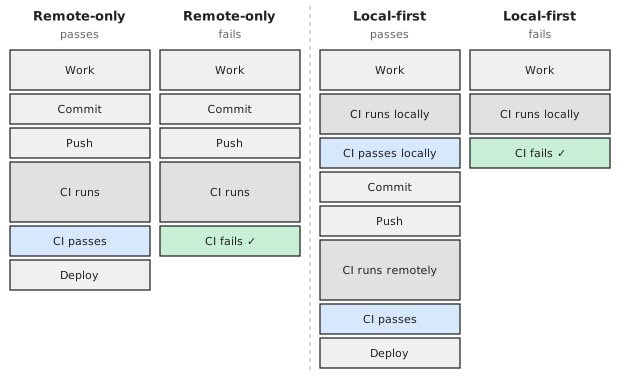
In the case where CI fails, local-first CI catches the failure sooner. In the case where CI passes, local-first CI adds extra overhead. (This disadvantage disappears with shared caching between local and remote CI.)
Why still run CI remotely?
It is essential that we also still run CI remotely because developers can forget to run it locally first. Indeed, if developers would never make mistakes, we wouldn't use any CI in the first place.
What if they diverge?
It is important that the local checks are the same as the remote checks. When they diverge, you can get into situations like this:
| Local passes | Local fails | |
|---|---|---|
| Remote passes | ✓ | Untrustworthy |
| Remote fails | Extra overhead | ✓ |
If CI passes locally before failing remotely, it was a waste of time to run it locally in the first place.
If CI fails locally before passing remotely, you could argue that you got an extra benefit because CI failed sooner, and you wouldn't even notice anyway because you would have fixed the issue before pushing.
However, in practice developers will notice sooner or later that they can ignore what CI does locally because CI will pass remotely anyway. At that point local-first CI becomes extra overhead without any benefit.
Local-first CI is faster
If CI can fail sooner, we can fix the issue sooner. You can see it in this diagram:

Clearly running more CI will take longer, so if CI never fails then running it twice (locally and remotely) will be slower than running it once (remote-only). The benefits appear as soon as CI fails at least once, and they grow with each additional failure cycle.
Note that the "CI fails" boxes in the remote-only part of the timeline are larger because developers tend to have much more powerful machines than their CI workers. For example, GitHub Actions' runners currently offer only 4 vCPUs and 16 GB RAM, considerably less than a typical developer machine.
Local-first CI avoids context switching
We know that developers tend to switch context instead of waiting for CI to finish remotely. The threshold for how fast your CI has to be to avoid context switching is extremely fast, so just about no CI system is fast enough to avoid it.
This means that the diagram above isn't quite accurate. If we include the context switching that happens when CI fails remotely, the timeline looks more like this:

Here we can see that local-first CI is faster starting from just one failure cycle because it avoids the context switching that happens when CI runs remotely.
This means that local-first CI keeps developers in the flow more effectively.
Local-first CI is locally reproducible
How often have you had a CI failure and no way to reproduce it locally? You then had no choice but to try to make a change, commit, push, and hope that it would fix the issue, a terribly frustrating experience. Hope is just not a good strategy for getting CI to pass.
When remote CI "just" runs ./ci.sh, you can run the same thing locally and often see the same failure locally. You can then fix it locally until ./ci.sh passes, and only then push.
Local-first CI avoids vendor lock-in
With remote-first CI, you define your build in a vendor-specific DSL: YAML for GitHub Actions, Jenkinsfiles for Jenkins, .gitlab-ci.yml for GitLab. Switching providers means rewriting your CI configuration from scratch.
When your CI is a command that runs the same way locally and remotely, the CI provider becomes interchangeable. Your build definition lives in your project, not in your provider's configuration format.
How to make your CI local-first
The naive solution is to "just" have a ./ci.sh script that you run both locally and remotely, but there is a lot of room for improvement over "just" doing that.
These are just some of the things that will go wrong when you "just" run ./ci.sh locally and remotely:
- Different dependency versions: CI uses
gcc 14, which accepts a flag that your localgcc 15doesn't. - Missing dependencies: CI has
jqpre-installed but you don't. - Different operating systems: CI runs on Linux but you develop on macOS, and
sed -ibehaves differently. - Implicit build state: CI starts clean and builds fine. Your local build fails because of stale object files from a previous build.
- Dirty working tree: CI checks out a clean tree. You have a local
.envfile that causes the tests to fail. - Different shell environment: CI runs bash, but you run zsh locally.
- Secrets and credentials: CI has a secret token injected. You don't have it locally.
The answer to almost all of these is "Nix fixes this". That's why I usually recommend running nix flake check instead of ./ci.sh for local-first CI. It has all the benefits of Nix: more likely to be reproducible, declarative, granular caching, and lets you use nix-native CI providers like NixCI.
This post is not about convincing you to use Nix, but in case you'd like to try setting up your first flake, I've prepared a page for you: Your first flake.
Conclusion
Local-first CI shortens the feedback loop by catching failures before you push, avoids the context switching that remote CI forces, makes CI failures reproducible on your own machine, and frees you from vendor lock-in. The hard part is keeping local and remote in sync, which is exactly what reproducible builds solve.